
Category: REAPER CUSTOMIZATION
-

ReaScript & ReaPack Tips
Answering common questions about ReaScript and ReaPack
-
Advanced Game Audio SFX Render Workflow
Maris Tammik is a Vancouver based sound designer working on video game sound effects and implementation. For their game audio endeavors they have developed a fast and flexible workflow to export large amounts of files with automatic file naming.
-

How to use the new ReaPack Extension for REAPER
ReaPack is a new extension for REAPER that manages downloading, installing and updating scripts, JSFX and more from GitHub Repositories.
-

Customizing Zoom and Scroll
Having intuitive controls for navigating time and tracks in a project cannot be overlooked. Over the years I have tried many things for zooming and scrolling in REAPER, and this is what I now stick to.
-
Identify Scales & Chords Instantly with free ReaScripts
Quickly analyze and identify chords and scales based on notes selected in the MIDI editor.
-
Instant Arpeggios & Chords
How to install custom actions for inserting Scales, Chords and Arpeggios into the MIDI Editor
-
Quick Change Track Layout
How to set up track layout change by double-clicking using the cycle action editor and mouse modifiers. A great way to help organize large projects.
-
How to use the RearrangeFX utility
RearrangeFX is a great new utility to solve the problem of organizing your REAPER FX folders. Finally you can drag and drop to sort your folders.
-
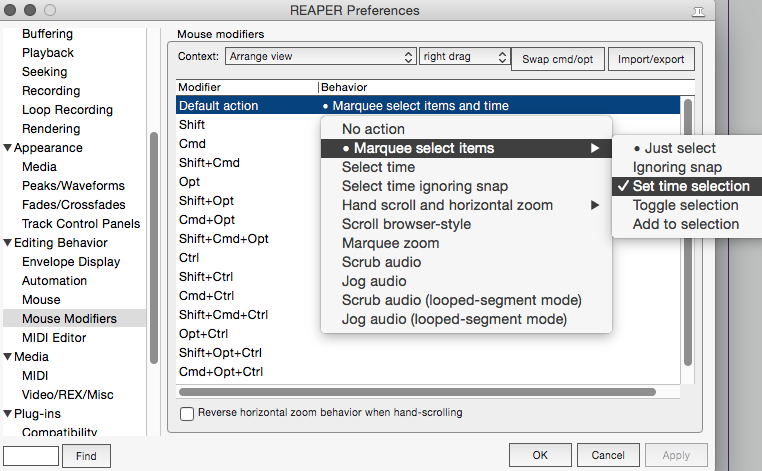
Selecting items and time at once
The essential mouse modifier preference to change for faster editing in REAPER.
-
Customizing Mixer Menus in REAPER
In this video Jon explains some of the actions he’s added to the Mixer context menus. Great actions to speed up mixing workflow.
-
Linking a MIDI Controller to REAPER Track Controls
Is your MIDI controller unused while mixing? Jon shows some ideas for using a MIDI controller for track controls, automation and more in REAPER.
-
Customizing the MIDI Editor
Jon shows his customization to the MIDI Editor Toolbar for much improved MIDI editing workflow