
Category: VIDEO
-
Video: How To Use Reaper’s “ReaComp” Compressor Plugin
In this Quick Tip video from AudioTuts, Ken Theriot demonstrates how to use the ReaComp compressor plugin in REAPER on a vocal.
-
Video: Slate Digital SSD 4 – Multi-Output Tutorial
The Slate Digital team put up a really quick tutorial for setting up SSD4 multichannel routing in REAPER. This isn’t how I set up SSD4 for my sessions but I just like things a certain way. After you follow the instructions in the video, name the tracks, put them in a folder and then save…
-
Reverse panning Tracks
In this video tutorial I show you a really quick way to reverse the panning of multiple tracks using the stereo width control. Player vs audience perspective? Who cares! it’s two seconds to flip.
-
Exclusive Solo in REAPER
A quick tutorial video showing how to use the exclusive solo function. Use this when you want to solo a track and un-solo all other tracks. Great for doing shootouts. The shortcut for exclusive solo is CMD+Option (Mac) or CTRL+ALT (PC), then click the solo button.
-
Video: Quick Theme Install
How to install REAPER themes
-
REAPER Advanced – SWS Extensions — New tutorial set from Kenny Gioia and Groove 3
Groove 3 has just released the latest tutorial video set for REAPER. This time it’s all about one of the more advanced aspects of REAPER, the SWS Extensions. A lot of users don’t understand the capabilities provided by the extensions or may not know they exist at all. This 3hr tutorial video series goes deep…
-
Video: TouchOSC with REAPER
I have a short video today to show you how to set up TouchOSC on an iPhone to control Reaper’s mixer and transport over wifi. The TouchOSC app is well worth the $4.99 spent. It was easy to set up even for someone with no experience with OSC like myself. You can also use TouchOSC…
-
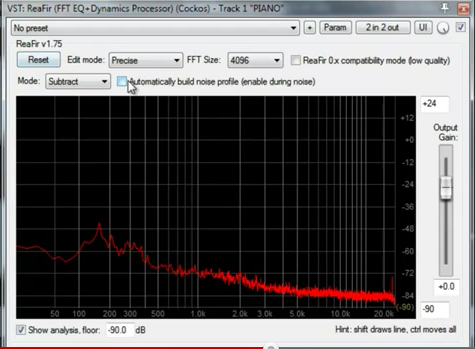
Video: Removing noise with ReaFir
I just came across a great quick tutorial from Total Composure on YouTube. By using ReaFir in subtract mode you can remove any constant hiss and noise from your recordings. It may not work as well as iZotope RX2, but it’s an impressive free option.
-
Video: Multiple Channel Outputs with KONTAKT 5
James Gilbert Music has uploaded a great tutorial for Native Instruments KONTAKT 5 users to help you understand and set up multi-channel audio and MIDI routing in Reaper. It’s a real pain to set this up all the time, so do it once and save it as either a project or track template. Thanks to…
-
Video: Auto-Panning (from Reaper Tips & Tricks)
Groove3 just released the latest tutorial video series Reaper Tips & Tricks, hosted by Kenny Gioia. The nearly 5hr tutorial set is on sale for $29.99 Here is one of the tutorials showing how to set up auto-panning effects using parameter modulation.
-
Video: Using Screensets in REAPER 4
This tutorial comes from Jonny Ginese at ReaperTutorials.com and shows how to use the screensets function to quickly jump from mixing to editing to split screen workflows. This quickly became one of my most used functions since R4 was released, it’s really easy to set up and really fast to use.
-
Video: One Handed Editing Using Mouse Modifiers
This video tutorial comes from Jonny Ginese at TutorialsForReaper.com. Jonny shows how to configure mouse modifiers so he can edit drums with one hand and pet his sad dog with the other.