
Category: TUTORIAL
-
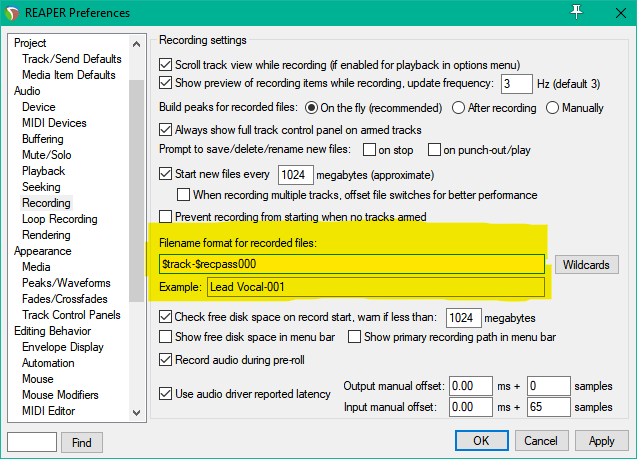
REAPER 101: File Names
How to configure file names for recorded items in REAPER
-
Video: Mastering with FabFilter Pro Plugins in REAPER
I came across two ridiculously good tutorial videos on mastering from FabFilter. Mastering engineer Dan Worrall demonstrates (in REAPER 4) how to use some of the FabFilter plugins for mastering. The MS mode for the sidechain is droolworthy almost, I’m going to have to check these effects out myself. Dan’s parallel upward compression trick is…
-
Video: Item/take FX (from Reaper 4 Explained)
Another freebie video from Groove3. In this clip from Reaper 4 Explained, host Kenny Gioia demonstrates the very powerful take FX function in detail. Get over 7 hours of REAPER 4 training with Groove3 Reaper 4 Explained.
-
REAPER 101: Peaks Folder
What the heck are peak files and why are they everywhere since installing REAPER? This tutorial will show you how to set up the alternate peak cache folder.
-
Video: Navigation (from Reaper 3 Explained)
Here is a freebie video from Groove3’s Reaper 3 Explained hosted by Kenny Gioia on making your way around your REAPER projects. An older video but still very helpful. The demonstration is using REAPER 3 defaults and everything should still apply to R4 and is customizable (it’s encouraged). Get 4 hours of REAPER 3 tutorial…
-
REAPER 101: Media Files Folder
REAPER 101 is a series of short tutorials to help you with setting up and using REAPER. To kick off the series, here is one to keep your projects neatly organized. By default REAPER projects do not use a media folder. All your audio files, project files, backups, and peaks are saved in one folder…
-
Track Template for Steven Slate Drums 3.5
Setting up the multichannel output for Kontakt in Reaper is not the easiest thing in the world. I set it up a few times and it’s not fun. The last time I got it set up perfectly I saved it as a track template and now I can instantly open Kontakt and all the extra…
-

#REAPER WEEK – 100 tips on using REAPER
A hundred quick tips for REAPER DAW users of all experience levels.
-
Audio 101: Latency
For fear of offending our readers we often steer clear of talking about the basics of audio and music production. However I’ve recently given a member of my extended family an Mbox as a gift and now I realise that there is so much we can take for granted. So if you’re experienced then this…
-
Audio 101: Compression
Compression, or dynamic range compression is used to reduce the dynamic range (the difference between the quietest and loudest parts) of the signal. It can be applied as an effect, so that the sound is obviously compressed or in subtle ways so that compression is applied in as transparent way as possible. There is no…
-
Audio 101: EQ
Eq is often used as a shortened version of the word equalisation or equalization (depending on where you live!). At its most basic level equalisation allows the user to adjust the bass and treble components of a sound level, found on any home stereo. Equalisation in modern studios is a far more complex affair and…
-
Home Recording for Beginners Book
Geoffrey Francis, the man behind REAPER manuals has released an excellent new book for those new to home recording. Home Recording for Beginners guides beginners step-by-step, through the fundamentals of home recording, using the computer as the recording medium. The emphasis is on practical instruction, delivered over the course of 30 lessons in easy-to-understand language…