
-
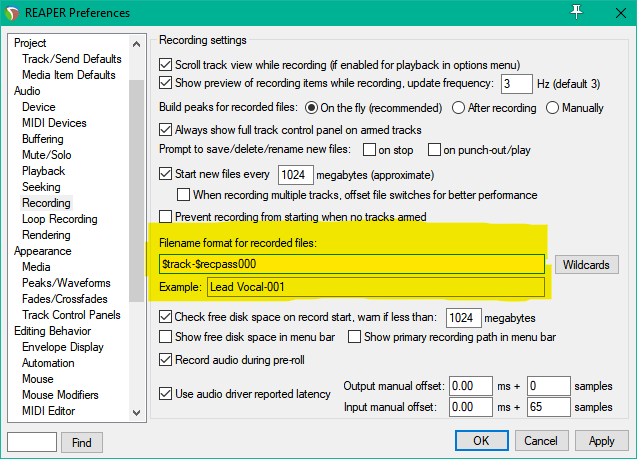
REAPER 101: File Names
How to configure file names for recorded items in REAPER
-
Video: Mastering with FabFilter Pro Plugins in REAPER
I came across two ridiculously good tutorial videos on mastering from FabFilter. Mastering engineer Dan Worrall demonstrates (in REAPER 4) how to use some of the FabFilter plugins for mastering. The MS mode for the sidechain is droolworthy almost, I’m going to have to check these effects out myself. Dan’s parallel upward compression trick is…
-
Video: Item/take FX (from Reaper 4 Explained)
Another freebie video from Groove3. In this clip from Reaper 4 Explained, host Kenny Gioia demonstrates the very powerful take FX function in detail. Get over 7 hours of REAPER 4 training with Groove3 Reaper 4 Explained.
-
REAPER 101: Peaks Folder
What the heck are peak files and why are they everywhere since installing REAPER? This tutorial will show you how to set up the alternate peak cache folder.
-
Video: Navigation (from Reaper 3 Explained)
Here is a freebie video from Groove3’s Reaper 3 Explained hosted by Kenny Gioia on making your way around your REAPER projects. An older video but still very helpful. The demonstration is using REAPER 3 defaults and everything should still apply to R4 and is customizable (it’s encouraged). Get 4 hours of REAPER 3 tutorial…
-
REAPER 4.15 Update
With nearly a month between updates we weren’t sure if we should be worried or excited. Today we got a big update with tons of fixes and little features. I don’t see any big features mostly refinements to make the current ones work even better. DOWNLOAD THE LATEST VERSION REAPER 4.15 Changelog The…
-
REAPER 101: Media Files Folder
REAPER 101 is a series of short tutorials to help you with setting up and using REAPER. To kick off the series, here is one to keep your projects neatly organized. By default REAPER projects do not use a media folder. All your audio files, project files, backups, and peaks are saved in one folder…
-
A peek at Justin’s REAPER
dea-man on the forum asked: Hey Justin, Christophe and Shwa… I would like to ask if I could see some screenshots of how you have YOUR Reaper configured, and set up. Maybe, with a little explanation? I am sure you guys must have the program wired. It would be very instructive and highly appreciated, I…
-
What’s so great about REAPER?
Back in August 2010 shortly after REAPER 4 came out I wrote this for the Home Recording Show Podcast, it got a bunch of people to give REAPER a chance. Its not really a review but just me raving about cool R4 features and how it compares to Pro Tools. ~Jon~ What’s so great about…
-
ReaTune updated
One of the things that caught my eye in the changelog for V4.14 was “ReaTune: resizable user interface, many UI improvements”. In case you didn’t know, ReaTune is the included pitch correction plugin for REAPER. You can do either automatic or manual (graphic style) pitch correction. It works pretty well for a freebie. Now that…
-
REAPER 4.14 update
A new update for REAPER came out today. Lots of little bug fixes. Nice to see some attention being given to ReaTune. Download here v4.14 – December 18 2011 + Audio Units: improved support for plug-ins that use unordered parameter IDs + Envelopes: added option to not show affected envelopes when moving items across tracks…
-
What do you hate about REAPER?
dukati started an interesting thread on the forum yesterday, What do you hate about REAPER? Surprisingly, compared to other DAW user forums, there are only a few users with real complaints in this thread. I’m struggling to come up with more than minor complaints. I could list several things about Logic, Cubase, Sonar, and Pro…
Need private REAPER lessons?
About
The aim of this website is to be an indispensable resource for the REAPER user community, providing news, reviews, tips & tricks, and detailed tutorials on music production using the REAPER software. Read More